
Agents
Zoho Desk
Sign in with Zoho so an agent answers new tickets and incoming replies in a Zoho Desk organization as email replies, and hands a ticket to your team by tagging it.
Connect a Zoho Desk organization and an agent answers its tickets. Every new ticket and every incoming reply reaches the agent, the agent answers as an email reply on the ticket, and when a person should take over it tags the ticket for your team and stops. You connect by signing in with Zoho; there is nothing to paste and nothing to set up inside Zoho Desk afterwards.
What the agent can do on Zoho Desk
| Capability | Supported |
|---|---|
| Voice | No |
| Text | Yes |
| Inbound | Yes. A new ticket, and each incoming reply on a ticket |
| Outbound | Replies only, sent as an email reply on the ticket from the address the ticket came in on. The agent does not create tickets |
| Handoff | Yes. The agent tags the ticket echonova_escalated, leaves a private comment and stops replying |
| Media | No. The agent reads the text of the reply and replies in text; attachments are not read |
A ticket conversation is written like email: the agent answers in a formal tone, without emoji, and sees the ticket's subject as context when the ticket provides one. The exact instruction the agent is given on this channel is in How the prompt is assembled. A ticket is one conversation on the agent's Conversations tab for as long as replies keep coming; a reply that arrives more than 24 hours after the last one starts a new conversation on the same ticket, and the agent does not carry the earlier exchange into it.
Prerequisites on the provider side
- A Zoho Desk organization, and the data center it lives in. The Data center region list offers US, Europe, India, Australia, Japan, Canada and Saudi Arabia; pick the one whose Zoho site you sign in on. Signing in on the wrong region fails to find the organization.
- A Zoho account that is an agent in that organization. Connecting signs in as that account and reads its agent profile, and every reply the agent sends is recorded in Zoho Desk as sent by that agent. Give the agent a Zoho Desk agent of its own; see Get it right below.
- The account must be allowed to create webhooks in the organization.
Connecting creates one, and the consent screen asks for four permissions:
Desk.tickets.ALL,Desk.basic.READ,Desk.webhooks.CREATEandDesk.webhooks.DELETE. - The organization is not already connected in another EchoNova workspace. A second attempt from elsewhere ends with That organization is already connected to a different EchoNova workspace.
- A Zoho account with several Zoho Desk organizations connects the first one on the account. To connect a different organization, sign in with an account whose first organization it is.
Connect
Step 1: Open the Channels tab and choose Zoho Desk
Open the agent and select Channels. The tab is headed Connected Channels. Press Add Channel and choose the Zoho Desk card under Support & Service; the card reads Support ticketing. The dialog Connect Zoho Desk Account opens on its Configure tab, beside Triggers.
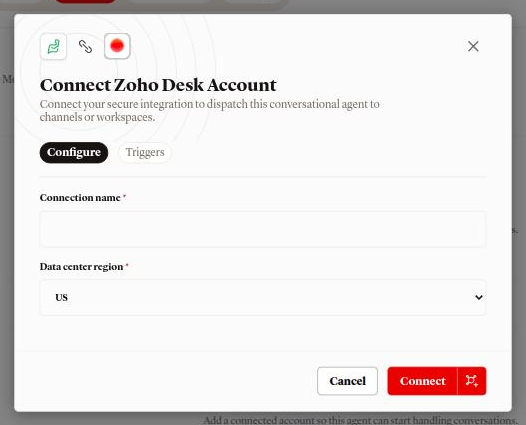
Step 2: Name the connection and pick the region
- Connection name: what the row is called in the Channels list. Required.
- Data center region: the list opens on US.
Connect stays disabled until Connection name has a value.
The Triggers tab holds one card, New tickets, with the line Tickets on this Zoho Desk account reach the connected agent. There is nothing to choose; the card describes what connecting sets up.
Step 3: Sign in with Zoho
Press Connect. The portal sends you to Zoho's sign-in page for the region you picked, in the same window. Sign in, approve the four permissions, and Zoho returns you to the agent's Channels tab. The sign-in link is valid for 10 minutes.
Step 4: Read the outcome
| Toast or dialog | What happened | What to do |
|---|---|---|
| Zoho Desk connected | The organization is connected and bound to this agent. A webhook named Echonova agent webhook was created in it, sending new tickets and incoming replies to the agent |
Send the first message |
| This channel was already connected. It's now linked to this agent. | The organization was already connected in this workspace, without an agent or to this agent. It is bound to this agent now | Nothing |
| Move this channel? | The organization is connected to another agent in this workspace | Move binds it to this agent and closes its open conversations; Cancel leaves it where it is |
| Access was declined. No changes were made. | You cancelled on Zoho's consent screen | Connect again and approve |
| No message. You land on the Agents list with nothing connected | More than 10 minutes passed, the link was used already, or the sign-in finished in a different browser from the one that started it | Open the agent again and start from its Channels tab |
| The connection didn't complete. Please try again. | Zoho did not hand over a usable sign-in | Connect again |
| That data center region isn't supported. Pick the region your account is in. | The region in the link was not one of the seven | Pick a region from the list and connect again |
| We couldn't find an organization on that account. Check that the data center region matches. | The account has no Zoho Desk organization on that region's site | Pick the region you sign in on |
| We couldn't look up your agent profile. Check the app's permissions and that you're an agent in this organization. | The account is not an agent in the organization, or a permission was withheld | Sign in as an agent of the organization and approve every permission |
| We couldn't create the webhook. Check the app's permissions, then reconnect. | The account is not allowed to create webhooks | Sign in as an account that is, such as an administrator |
| That organization is already connected to a different EchoNova workspace. | The organization belongs to another EchoNova workspace | Disconnect it there first |
| We couldn't save the connection. Please try again. or Something went wrong connecting this channel. Please try again. | The connection could not be saved; anything created in Zoho Desk was removed again | Connect again |
The row shows your Connection name, Zoho Desk org followed by the
organization's id under Workspace, Zoho Desk under Routing, and
the chip Active.
Get it right
Sign in with a Zoho Desk agent set aside for the agent. Replies are recorded in Zoho Desk as sent by the signed-in agent, and a reply by that agent is recognised as one of the agent's own, so a person answering from the same account is not seen as a person.
Recommended
- A Zoho Desk agent created for the agent, for example named after it, that nobody on your team signs in as. A reply from anyone else on your team is then recognised as a person stepping in.
Less effective
- Your own account. Your replies on a ticket are then treated as the agent's own, and the conversation on the Conversations tab is not closed when you step in.
Send the first message
Create a ticket the way a customer would, for example by emailing your support address: "Hi, my order 41822 hasn't arrived yet, can you check?" The agent's reply is sent as an email reply on the ticket, from the support address the ticket came in on to the customer's address, and appears in the ticket's thread. Reply as the customer and the agent answers again.
The agent uses the Personality you set on the Persona tab, plus the channel instruction and the ticket subject described in How the prompt is assembled. The Greeting message is not sent on a ticket; the agent's first message is its answer.
In the portal, open the agent's Conversations tab: the exchange is listed
under Zoho Desk as Ticket requester followed by # and the last four
characters of the ticket id, or under the requester's name when the ticket
carries one. Each reply is priced as a text turn; see
What a turn costs.
If the workspace has no credits left, the customer's reply is recorded in the conversation and nothing is sent on the ticket. If a reply cannot be produced, the ticket receives the reply "Sorry, I can't respond right now. Please try again shortly."
Provider limits that affect you
| Limit | Value | Effect |
|---|---|---|
| Connections per organization | 1 | A second connect in this workspace binds or offers to move the existing connection; from another workspace it is refused |
| Agents per connection | 1 | Use Assign to another agent to move it |
| Organizations per sign-in | The first on the account | An account with several organizations always connects the first |
| Regions | 7 | US, Europe, India, Australia, Japan, Canada, Saudi Arabia |
| Sign-in link | 10 minutes | Finish the Zoho sign-in within that time, once, in the browser that started it |
| What the agent answers | The latest thread on the ticket, when it is an incoming one | A comment on the ticket is not a reply and is not answered |
| Content | Text in both directions | Attachments are not read; the agent sends text |
| Ticket idle gap | 24 hours | A reply after a longer silence starts a new conversation with no memory of the earlier one |
| Handoff tag | echonova_escalated |
Checked on the ticket before every reply, whatever its letter case; it cannot be renamed |
Disconnect
Open the row's menu on the Channels tab and choose Disconnect, or open the channel's detail page, press Test and choose Disconnect from the menu. The dialog Disconnect channel? reads "This permanently deletes {name} and its saved credential. Reconnecting later starts a brand new connection." Confirm with Disconnect; the toast Channel disconnected follows.
Disconnecting closes the organization's open conversations, revokes and
deletes the saved Zoho access, and removes the Echonova agent webhook from
your Zoho Desk organization. Reconnecting creates a new connection and a new
webhook. Conversations already recorded stay on the agent, and the
echonova_escalated tag stays on the tickets that carry it.
To keep the connection but stop this agent answering, choose Assign to another agent from the row's menu instead. Open conversations are closed and the next reply goes to the agent you picked.
Troubleshooting
The sign-in ended with an error toast
The table under Step 4 lists every message and what to do. The two that come from your Zoho setup rather than the sign-in itself are the region, which must be the site you sign in on, and the account, which must be an agent of the organization and allowed to create webhooks.
The agent does not answer a ticket
Check, in this order:
- The ticket does not carry
echonova_escalated. While it does, the agent stays off it; remove the tag to hand the ticket back. - The latest thread on the ticket is an incoming reply from the customer. A reply sent by anyone on your team stops the agent for that reply, and a comment is not read at all.
- The
Echonova agent webhookstill exists in the organization. If it was deleted, disconnect the channel and connect again. - The workspace has credits. With none left, replies are recorded and nothing is sent.
Replies stopped after Zoho access was revoked
When the saved Zoho access can no longer be renewed, for example after it was revoked from the Zoho account, the agent's replies fail to send and the customer receives nothing. Signing in again with the same organization does not renew the saved access: disconnect the channel and connect it again.
The customer got "Sorry, I can't respond right now. Please try again shortly."
The agent could not produce a reply for that turn. The customer's message is kept in the conversation; the agent answers their next reply.
Pause Channel does nothing
Pause Channel on the channel's detail page does not stop the channel today. To stop the agent answering, disconnect the channel or assign it to another agent.
FAQ
Does the agent answer tickets that existed before I connected?
Yes. Any ticket without the echonova_escalated tag reaches the agent the
next time the customer sends an incoming reply on it. To keep a ticket away
from the agent, add the tag to it.
Which region do I pick?
The one whose Zoho site you sign in on: zoho.com is US, zoho.eu is
Europe, zoho.in is India, zoho.com.au is Australia, zoho.jp
is Japan, zohocloud.ca is Canada and zoho.sa is Saudi Arabia.
What does the customer see when the agent hands off?
The agent's last reply, and then a person. The ticket is tagged
echonova_escalated and carries the private comment Echonova agent escalated this ticket — full transcript is in the comment thread. for your
team. Human handoff covers how to write the
trigger.
How do I give a ticket back to the agent?
Remove echonova_escalated from it. The agent answers the customer's next
incoming reply.
Can I rename the handoff tag?
No. Every helpdesk connection uses echonova_escalated. Build your Zoho Desk
views and workflow rules on that name.
Can I connect two organizations?
Yes, one connection each, provided each is the first organization on the account you sign in with. Each connection answers as one agent.
Related
- Human handoff: what tagging the ticket does, and how to write the trigger
- How the prompt is assembled: the instruction the agent is given on a ticket
- Write the persona: the Personality the agent answers with
- Find and read a conversation: where ticket conversations are listed
- What a turn costs: what each reply is charged
- Channels overview: every channel side by side
- Agent status: pausing or archiving does not stop a connected channel