
Agents
Genesys Cloud voice
What the Audio Connector trigger on a Genesys Cloud connection is for, what a phone call routed through it does today, and where to put an agent on the phone instead.
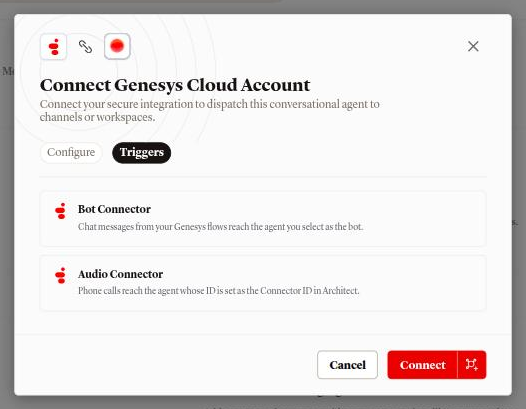
A Genesys Cloud connection carries two triggers. Bot Connector is chat, covered in Genesys Cloud chat. Audio Connector is the trigger for phone calls that a Genesys call flow streams to an agent. This page says what that trigger is for, what a call routed through it does today, and how to put an agent on the phone instead.
What the agent can do on Genesys Cloud voice
| Capability | Supported |
|---|---|
| Voice | A call routed through a Call Audio Connector action is not answered by the agent today |
| Text | Yes, through Bot Connector. See Genesys Cloud chat |
| Inbound | No |
| Outbound | No |
| Handoff | No |
| Media | No |
What the trigger is for
The Audio Connector card on the connection's Triggers tab reads Phone calls reach the agent whose ID is set as the Connector ID in Architect. Genesys Cloud's Audio Connector is an integration installed from Genesys AppFoundry. It needs BYOT Rate E enabled on the organization, an Inbound Call Flow in Architect with a Call Audio Connector action whose Connector ID is the agent's id, and three values from the connection: a Base Connection URI, an API Key and a Client Secret. Genesys caps such a call at 15 minutes by default.
Today a call that reaches a Call Audio Connector action is not answered by
the agent. The three values are in the Connections view: add ?tab=connections
to the agent's address, press the more button on the Genesys Cloud row,
open the How to connect tab and find Voice (Audio Connector). Base
Connection URI is shown as is. API Key shows Not set up yet until
you press Set up voice; Set up voice (later Generate new keys)
shows the API Key and Client Secret once, and any older keys stop
working.
Connect
The connection is the one described in Genesys Cloud chat: Add Channel, Genesys Cloud under Support & Service, then Connection name, Region, OAuth Client ID and OAuth Client Secret on the Configure tab. Connecting once gives the connection both triggers, and the dialog's Triggers tab shows both cards.
Put an agent on the phone
Connect a Twilio phone number to the agent. Callers reach the agent on that number, hear its greeting in its own voice, and the call lands in Conversations like a playground call. The steps are in Voice with Twilio.
For a call that starts inside Genesys Cloud and should end with a person, use
the chat trigger for the conversation and the flow's escalate branch for the
queue; see Genesys Cloud chat.
Disconnect
Disconnecting the connection is the same action as on the chat page: the row's Disconnect, the dialog Disconnect channel?, and the toast Channel disconnected. Nothing changes in Genesys Cloud; an Audio Connector integration you installed there stays until you remove it.
FAQ
How do I get an agent to take phone calls?
Connect a Twilio phone number to it; see Voice with Twilio. The Genesys Audio Connector trigger is described above.
Does the chat trigger work on the same connection?
Yes. Bot Connector and Audio Connector are independent triggers on one connection; see Genesys Cloud chat for what the chat side needs.
Is a Genesys call charged?
A call that is not answered starts no conversation and is not charged.
Related
- Genesys Cloud chat: the trigger on this connection that carries conversations
- Voice with Twilio: the phone channel that answers calls
- Channels overview: every channel side by side
- Test your agent: the Call a phone call behaves like
- Voices and language: the voice a caller hears on a phone channel