
Agents
SMS with Twilio
What a connected Twilio number gives an agent on the text side, what the Send SMS action does, and what happens to a text message sent to the number.
A Twilio phone number connected to an agent is the agent's phone line and the number its Send SMS action sends from. One connection covers both. This page is the text side: what Send SMS does, what happens to a text message someone sends to the number, and how the connection is made. Calls on the same number are covered in Voice with Twilio.
What the agent can do on SMS
| Capability | Supported |
|---|---|
| Voice | Yes, on the same connection. See Voice with Twilio |
| Text | Outbound only, through the Send SMS action |
| Inbound | A text sent to the number is not answered by the agent |
| Outbound | Yes. One message per Send SMS call, sent from the connected number to any phone number |
| Handoff | No |
| Media | No. Text only |
Prerequisites on the provider side
- A Twilio account, and its Account SID and Auth Token, both shown on the Twilio Console home page at twilio.com/console. Connecting signs in to Twilio with them.
- A phone number that belongs to that Twilio account. Connecting looks the number up in the account and refuses a number that is not there.
- The number must not already be connected anywhere in EchoNova. A phone number can be connected once, to one agent.
The Auth Token gives full control of your Twilio account. Paste it only into the Auth Token field of the connect dialog. Never put it in the agent's Personality box, a tool description or a knowledge document, because those are read by the agent on every turn.
Connect
Twilio uses one connect form for calls and text. Connecting once gives the agent both.
Step 1: Open the Channels tab and choose Twilio
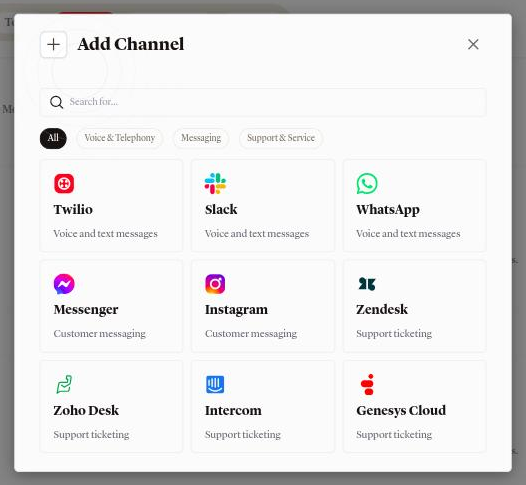
Open the agent and select Channels. Press Add Channel. The catalog lists Twilio under Voice & Telephony with the line Voice and text messages. Select it.
Step 2: Fill in the Configure tab
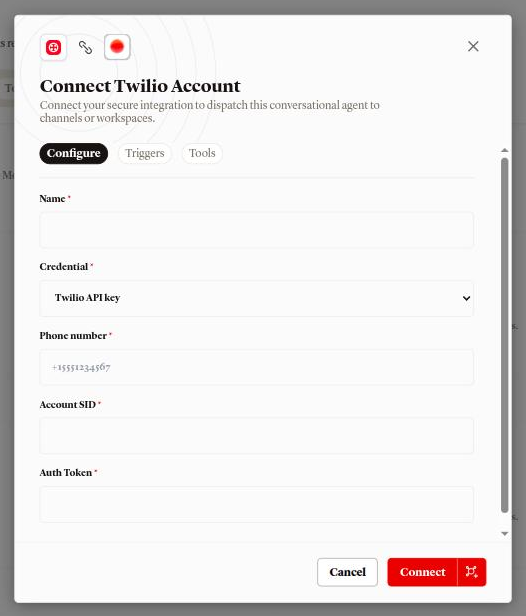
The dialog is titled Connect Twilio Account. Its Configure tab takes five fields, all required:
- Name: the label shown in the Channels list, for example
Support line. - Credential: one option, Twilio API key. Leave it as it is.
- Phone number: the Twilio number, with its country code. The placeholder
is
+15551234567. Spaces and dashes are accepted and removed; the number is kept in the compact international form. - Account SID: from your Twilio account.
- Auth Token: from your Twilio account. The field hides what you type.
Connect stays disabled until Name, Phone number, Account SID and Auth Token all have a value.
Step 3: Read the Triggers and Tools tabs
The Triggers tab holds one card, Incoming calls, with the line Calls to this number reach the connected agent. The Tools tab is headed Actions available through your Twilio integration. and holds one card, Send SMS, with the line Send a text message to any phone number from your connected number.
Step 4: Press Connect
Connecting signs in to Twilio, checks that the number is in the account, and points the number at EchoNova by setting its voice and messaging webhooks for you. There is nothing to paste into the Twilio console.
Connecting replaces whatever the number's voice and messaging webhooks pointed at before. If the number served another application, that application stops receiving the number's calls and texts.
On success a toast reads Channel connected and the row appears under Voice & Telephony with your Name, the number under Phone number, Twilio under Routing, and the chip Active.
Send SMS
Send SMS is an integration tool: an action that comes ready-made from the connection and sends from the connected number. Its description, the text the agent reads to decide when to use it, is Send an SMS text message from the connected Twilio number. It takes two values, both required:
| Parameter | What the agent fills in |
|---|---|
to |
Recipient phone number in E.164 (e.g. +15551234567). |
body |
The text message body to send. |
The message is sent from the connected number to to. When Twilio refuses the
message, the agent is told the send failed and answers from that.
There is no control in the portal today that adds Send SMS to an agent; the Tools tab of the connect dialog describes the action.
Sending a message costs nothing in credits by itself. The turn that called the tool is charged like any other turn; see What a turn costs. Twilio's own charge for the message is billed by Twilio to your account.
Incoming texts
A text message sent to the connected number is received by Twilio and is not answered by the agent, and it does not appear in Conversations. For a two-way text conversation with the agent, connect a text channel: WhatsApp, Messenger, Instagram, Slack or a helpdesk.
Provider limits that affect you
| Limit | Value | Effect |
|---|---|---|
| Connections per phone number | 1 | A number already connected, in any EchoNova workspace, is refused with Phone number "..." is already connected, with the number in place of the dots |
| Message format | Plain text | Send SMS takes a text body and nothing else |
Disconnect
Open the row's actions menu and choose Disconnect. The dialog Disconnect channel? names the connection and reads This permanently deletes Support line and its saved credential. Reconnecting later starts a brand new connection. Disconnecting gives the number's call and SMS settings back to what they were. A toast reads Channel disconnected.
The Account SID and Auth Token are removed from EchoNova. EchoNova puts the number's voice and messaging webhook URLs back to what they were before you connected it; a number that had none is left with none. Each webhook is checked on its own: one you already pointed somewhere else in the Twilio console is left as it is.
If Twilio can't be reached at the moment you disconnect, the channel is still removed. Check the number's webhooks in the Twilio console afterwards.
Troubleshooting
Every connect failure is shown as an Error toast carrying the reason.
Invalid Twilio credentials
Twilio rejected the Account SID and Auth Token pair. Copy both again from the same Twilio account and retry.
That number isn't in this Twilio account
The number is not owned by the account whose credentials you entered, or it was typed differently from how Twilio lists it. Check the country code.
Phone number "..." is already connected
The toast carries the number in place of the dots. The number is connected already, in this workspace or another one. Disconnect it there first. To move it between two of your own agents, use Assign to another agent on the existing row instead of connecting again.
Could not reach Twilio
Twilio did not answer; the toast carries the reason after the colon. Retry in a moment.
Failed to configure Twilio webhooks
Twilio refused the change to the number. The toast carries Twilio's own reason when Twilio gives one. Check that the credentials belong to the account that owns the number, then retry.
FAQ
Does the agent reply when someone texts the number?
No. See Incoming texts above for the channels that carry a two-way text conversation.
Can the agent text a caller during a phone call?
That is what Send SMS is for: the agent sends a message from the connected number to any phone number it is given. See Send SMS above for what the portal offers for it today.
Can I connect one Twilio number to two agents?
No. A number is connected to one agent. To move it, open the row's actions menu and choose Assign to another agent.
Do I need a separate connection for SMS and for calls?
No. The same Connect Twilio Account dialog covers both, and one row in the Channels list carries both.
What does Twilio charge?
Twilio bills your own Twilio account for calls and messages on the number. EchoNova charges the conversation per turn, and a Send SMS call adds no charge of its own.
Related
- Voice with Twilio: the call side of the same connection
- Channels overview: every channel side by side, and which one to launch first
- Tools overview: what an integration tool is and how the agent decides to call one
- What a turn costs: what a turn that calls a tool is charged
- Secrets: where credentials belong when a tool of your own needs one
- Agent status: what pausing an agent does and does not do to a connected number